Saturday, August 10, 2019

Cara Install PosgreSQL di Debian

PostgreSQL is an open source object-relational database system. It is one of leading database server used for production servers. This tutorial will help you to install the PostgreSQL database server on Debian 8 Jessie systems.
Step 1 – Prerequsities
First, you need to import PostgreSQL packages signing key on your system. Use the below command to import the key.
wget -q https://www.postgresql.org/media/keys/ACCC4CF8.asc -O - | sudo apt-key add -
Now add PostgreSQL apt repository in your system as per your operating system. These are suggested on official PostgreSQL website using following command.
sudo sh -c 'echo "deb http://apt.postgresql.org/pub/repos/apt/ jessie-pgdg main" >> /etc/apt/sources.list.d/pgdg.list'

Step 2 – Install PostgreSQL on Debian 8

At this stage, you have successfully added PostgreSQL official repository in your system. Now update the repository list. After that install Latest PostgreSQL Server in our Ubuntu system using following commands.
sudo apt-get update
sudo apt-get install postgresql postgresql-contrib

Step 3 – Connect to PostgreSQL

After installing the PostgreSQL database server by default, it creates a user ‘postgres’ with role ‘postgres’. It also creates a system account with the same name ‘postgres’. So to connect to postgres server, login to your system as user postgres and connect database.
sudo su - postgres
psql
Now you are logged in to PostgreSQL database server. To check login info use following command from database command prompt.
postgres-# \conninfo
To disconnect from PostgreSQL database command prompt just type below command and press enter. It will return you back to Debian command prompt.
postgres-# \q
Your PostgreSQL installation has been completed successfully. 

Friday, August 9, 2019

Cara Install Guest Addition Virtual Box untuk Debian

How to Install Virtualbox Guest Additions on Debian Step by Step


In this tutorial I will show you how to install virtualbox guest additions on Debian virtual machine. Guest additions allow your guest OS to be full screen. So you can use the guest OS just like you are using a normal OS. I am using elmentary OS as the host OS, but the following method works for any host OS.
Tip: Guest additions are to be installed inside a guest OS.

Install Virtualbox Guest Additions on Debian

Log into Debian (Guest OS) as root and update your software.
apt-get update && apt-get upgrade
Install required packages for building kernel modules.
apt-get install build-essential module-assistant
Prepare your system for building kernel module
m-a prepare
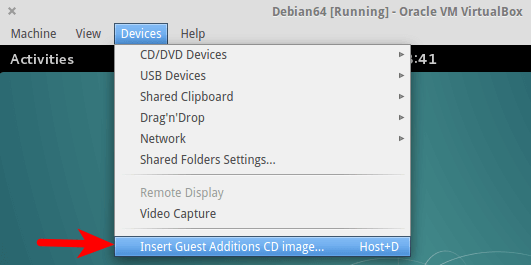
In the virtual machine window, select Devices > Insert Guest Additions CD image.
virtualbox guest addition
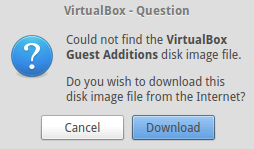
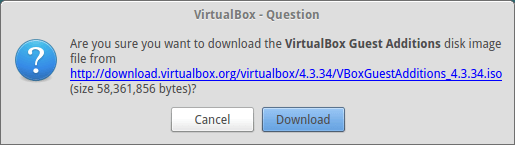
It will ask you to download the guest additions iso image. Click Download.
virtualbox guest additions
If you can’t download it from the above window, then go to http://download.virtualbox.org/virtualbox/. Select a version and download VBoxGuestAdditions iso to your home directory.
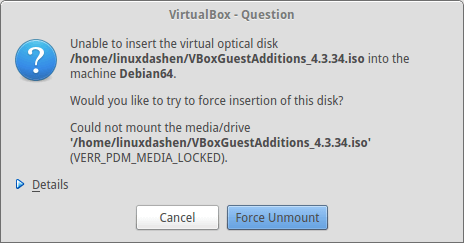
Once downloaded, insert the iso image. If you see the following error, click force umount.
Install Virtualbox Guest Additions on Debian
In Debian terminal, run
mount /media/cdrom
Under /media/cdrom directory there’s a shell script named VboxLinuxAdditions.run. Run this script.
sh /media/cdrom/VBoxLinuxAdditions.run
Outputs
Verifying archive integrity... All good.
Uncompressing VirtualBox 4.3.34 Guest Additions for Linux............
VirtualBox Guest Additions installer
Copying additional installer modules ...
Installing additional modules ...
Removing existing VirtualBox DKMS kernel modules ...done.
Removing existing VirtualBox non-DKMS kernel modules ...done.
Building the VirtualBox Guest Additions kernel modules ...done.
Doing non-kernel setup of the Guest Additions ...done.
You should restart your guest to make sure the new modules are actually used

Installing the Window System drivers
Installing X.Org Server 1.16 modules ...done.
Setting up the Window System to use the Guest Additions ...done.
You may need to restart the the Window System (or just restart the guest system)
to enable the Guest Additions.

Installing graphics libraries and desktop services components ...done.
Note that building kernel module must be successful. Now restart your virtual machine. You should be able to enter full screen mode by pressing Right Ctrl + F.


Tuesday, August 6, 2019

ACTIVE DIRECTORY, USER MANAGEMENT AND REMOTE INSTALLATION SERVICE (RIS)


pada kesempatan kali ini kita akan membahas secara ringkas tentang cara konfigurasi DHCP Server pada windows server 2003.


oke mari kita bahas, setelah pesan-pesan berikut.

DHCP (Dynamic Configuration Protocol) adalah layanan yang secara otomatis memberikan nomor IP kepada komputer yang memintanya. Komputer yang memberikan nomor IP disebut sebagai DHCP server, sedangkan komputer yang meminta nomor IP disebut sebagai DHCP Client.

Dengan demikian administrator tidak perlu lagi harus memberikan nomor IP secara manual pada saat konfigurasi TCP/IP, tapi cukup dengan memberikan referensi kepada DHCP Server.

Pada saat kedua DHCP client dihidupkan, maka komputer tersebut melakukan request ke DHCP-Server untuk mendapatkan nomor IP. DHCP menjawab dengan memberikan nomor IP yang ada di database DHCP.

DHCP Server setelah memberikan nomor IP, maka server meminjamkan (lease) nomor IP yang ada ke DHCP-Client dan mencoret nomor IP tersebut dari daftar pool. Nomor IP diberikan bersama dengan subnet mask dan default gateway. Jika tidak ada lagi nomor IP yang dapat diberikan, maka client tidak dapat menginisialisasi TCP/IP, dengan sendirinya tidak dapat tersambung pada jaringan tersebut.


Mohon perhatikan dengan benar dan teliti agar proses konfigurasi berjalan dengan lancar.
·       Buka Program Aplikasi VirtualBox
·       Dan jalankan Windows Server 2003nya

Monday, November 12, 2018

Cara Menampilkan Koding dalam Postingan Blogger

Saya telah menggunakan blogger cukup lama, namun baru sekarang ini saya mau memulai untuk posting kembali. hahahaha.
Saya sudah cukup terkesan dengan betapa mudahnya untuk memperbarui tampilan dan nuansa blog Anda dan seberapa bebas Anda dengan HTML dan tata letak semantik halaman.
Saya rasa agak aneh kalo kita sedang membagikan teks syntak suatu kode namun barisan kode itu sama dengan kode yang lainnya, pasti akan terlihat begitu membingungkan. 
Satu hal yang sepertinya hilang adalah memungkinkan pengembang untuk menyalin dan menempelkan kode ke blog mereka dan memungkinkan pengguna lain untuk menyalin dan menempelkan kode dari blog ke kode mereka sendiri.

Tuesday, October 23, 2018

Setup SSH Keys

Pada penerapan sistem autentikasi yang lebih aman, SSH Key lebih dianjurkan ketimbang menggunakan password seperti pada umumnya. Jika autentikasi dengan password dapat diserang dengan menggunakan cara bruteforce, maka SSH Key akan lebih susah bahkan hampir tidak mungkin untuk di dechiper. Nah, SSH Key memiliki keunggulan dan implementasi ini sangat bermanfaat terutama bagi anda yang ingin melakukan provisioning menggunakan tools semacam Ansible.

How To Add NodeJS in Linux

Android

Android support is still experimental in Node.js, so precompiled binaries are not yet provided by Node.js developers.
However, there are some third-party solutions. For example, Termux community provides terminal emulator and Linux environment for Android, as well as own package manager and extensive collection of many precompiled applications. This command in Termux app will install the last available Node.js version:

Bagaimana Cara Install NodeJS di Linux

NodeJS is an open source, cross-platform, and lightweight JavaScript run-time environment that can be used to build scalable network applications. It is fast and efficient server-side software built on Chrome’s V8 JavaScript engine. Initially, JavaScript was primarily used for client-side scripting. But, Nodejs enables JavaScript to be used for server-side scripting, and runs scripts server-side to produce dynamic web pages. Another notable thing is Nodejs has a command-line utility called npm, a package manager to install, manage nodejs libraries and applications. Nodejs package ecosystem is the largest ecosystem of open source libraries in the world.
NodeJS v10.0.0 has been released yesterday. It is the seventh major nodejs release since the launch of NodeJS foundation. This major release ships with some prominent features as listed below.

Modifikasi pathname pada terminal linux menjadi lebih pendek

Bagi pengguna linux turunan ubuntu seperti ubuntu 16.04 yang saya gunakan, ada beberapa hal yang cukup membuat kita ribet dengan pathname pa...